[Amster] RouterOS Scripts Welcome to new, optimized and fixed RouterOS scripts! |
[Amster] RouterOS Scripts

a collection of scripts for MikroTik RouterOS
RouterOS ↗️ is the operating system developed by MikroTik ↗️ for networking tasks. This repository holds a number of scripts ↗️ to manage RouterOS devices or extend their functionality.
Use at your own risk, pay attention to license.
Requirements
Software (RouterOS)
Latest version of the scripts require recent RouterOS to function properly. Make sure to install latest updates before you begin. This is supposed to work flawlessly with these channels:
stable- the latest version considered stable for daily use, including new featureslong-term- a version considered rock-solid, usually one minor version behindstable(7.(n-1))
New functionality or breaking changes in RouterOS are adopted fairly quick.
These changes are pushed for general availability once a version of
RouterOS supporting this had been released to the long-term channel a
reasonable time ago.
At any time you should have at least two minor versions and their bugfix releases to choose from. Often way older versions of RouterOS work just fine.
On the other hand in seldom cases and for good reasons specific scripts
may require an even newer RouterOS version, so only stable is supported
temporarily.
💡️ Hint: If in doubt have a look at the badge at the top of each page showing the minimum version required:
ℹ️ Info: The
mainbranch is now RouterOS v7 only. If you are still running RouterOS v6 switch torouteros-v6branch!
Prerequisite configuration
The
device-mode ↗️
is a mechanism to lock down a device for security reasons, it gives
fine-grained control over what features are available. You need to enable
scheduler and fetch at least, specific scripts may require additional
features.
Hardware
RouterOS packages increase in size with each release. This becomes a problem for devices with 16MB storage and below, those with an ARM CPU are specifically affected.
Huge configuration and lots of scripts give an extra risk. Take care!
Initial setup
ℹ️ Info: For a comfortable installation, I came up with a script: AM-setup.rsc. Below are the commands for the right system administrators, with straight hands. :) And if anyone doesn't like it, write, let's have a laugh together!
-
Step by step:
:global GlobalScriptsUrl "https://ros.vados.ru/";
:global RemoveMe false;
/system/script/add name="AM-setup" owner="AM-setup" source=([/tool/fetch check-certificate=yes-without-crl url=($GlobalScriptsUrl . "AM-setup.rsc") output=user as-value]->"data");
/system/script/run AM-setup;
-
One string:
:global GlobalScriptsUrl "https://ros.vados.ru/"; :global RemoveMe false; /system/script/add name="AM-setup" owner="AM-setup" source=([/tool/fetch check-certificate=yes-without-crl url=($GlobalScriptsUrl . "AM-setup.rsc") output=user as-value]->"data"); /system/script/run AM-setup;
💡️ Hint: To prevent the installation script from being deleted 30 seconds after its completion, you can use a global variable [
:global RemoveMe false;]. Don't worry, the script will delete all its global variables. Shall we check? ;)
The long way in detail
The update script does server certificate verification, so first step is to establish trust.
Builtin trust store
RouterOS comes with a builtin trust store with several CA certificates. If you intend not to trust this store jump to download and import certificate now.
Select the fetch command to trust these builtin certificates at
least, but make sure not to drop other targets:
/certificate/settings/set builtin-trust-store=fetch;

💡️ Hint: With RouterOS 7.20.x and before the functionality was different. Set the trust for the builtin trust anchors:
/certificate/settings/set builtin-trust-anchors=trusted;
You can skip the steps regarding download and import certificate and jump to installation of scripts now.
Download and import certificate
If you intend to download the scripts from a different location (for example from github.com) install the corresponding certificate chain.
/tool/fetch "https://rsc.eworm.de/main/certs/Root-YE.pem" dst-path="root-ye.pem";

ℹ️ Info: Note that the command above does not verify server certificate, so if you want to be safe download with your workstations's browser from CA's website and transfer the file to your MikroTik device: Let's Encrypt / ISRG Root YE ↗️
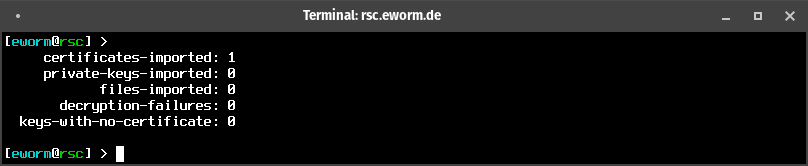
Then we import the certificate.
/certificate/import file-name="root-ye.pem" passphrase="";
Do not worry that the command is not shown - that happens because it contains a sensitive property, the passphrase.
For basic verification we rename the certificate and print it by fingerprint. Make sure exactly this one certificate ("Root-YE") is shown.
/certificate/set name="Root-YE" [ find where common-name="Root YE" ];
/certificate/print proplist=name,fingerprint where fingerprint="e14ffcad5b0025731006caa43a121a22d8e9700f4fb9cf852f02a708aa5d5666";
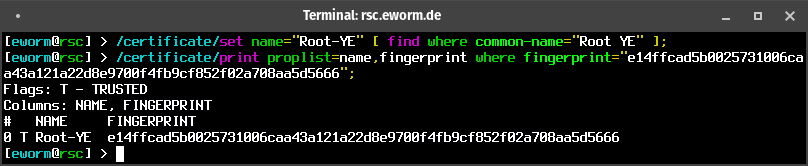
Always make sure there are no certificates installed you do not know or want!
Installation of scripts
All following commands will verify the server certificate. For validity the certificate's lifetime is checked with local time, so make sure the device's date and time is set correctly!
Now let's download the main scripts and add them in configuration on the fly.
:foreach Script in={ "global-config"; "global-config-overlay"; "global-functions" } do={ /system/script/add name=$Script owner=$Script source=([ /tool/fetch check-certificate=yes-without-crl ("https://rsc.eworm.de/main/" . $Script . ".rsc") output=user as-value ]->"data"); };

And finally run configuration and functions. This will also add the scheduler for loading at system startup automatically.
/system/script { run global-config; run global-functions; };

💡️ Hint: You see complaints regarding syntax errors? Most likely the RouterOS on your device is too old. Check for updates!
Scheduled automatic updates
The last step is optional: Add this scheduler only if you want the scripts to be updated automatically!
/system/scheduler/add name="ScriptInstallUpdate" start-time=startup interval=1d on-event=":global ScriptInstallUpdate; \$ScriptInstallUpdate;";

Editing configuration
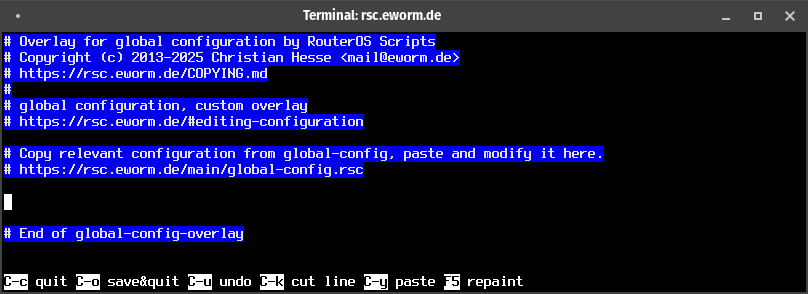
The configuration needs to be tweaked for your needs. Edit
global-config-overlay, copy relevant configuration from
global-config (the one without -overlay).
Save changes and exit with Ctrl-o.
/system/script/edit global-config-overlay source;
Additionally creating configuration snippets is supported. The script name
of these snippets has to start with global-config-overlay.d/ to make them
being loaded automatically. This allows to split off parts of the
configuration.
To apply your changes run global-config, which will automatically load
the overlay as well:
/system/script/run global-config;

This last step is required when ever you make changes to your configuration.
ℹ️ Info: It is recommended to edit the configuration using the command line interface. If using Winbox on Windows OS, the line endings may be missing. To fix this run:
/system/script/set source=[ :tocrlf [ get global-config-overlay source ] ] global-config-overlay;
Updating scripts
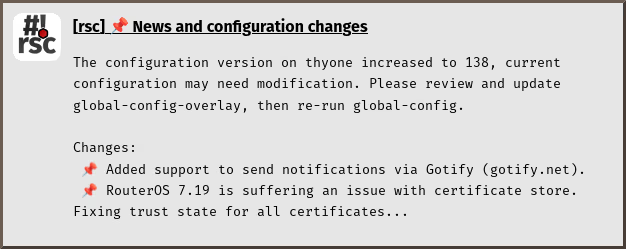
To update existing scripts just run function $ScriptInstallUpdate. If
everything is up-to-date it will not produce any output.
$ScriptInstallUpdate;

If the update includes news or requires configuration changes a notification is sent - in addition to terminal output and log messages.
Adding a script
To add a script from the repository run function $ScriptInstallUpdate with
a comma separated list of script names.
$ScriptInstallUpdate check-certificates,check-routeros-update;

Scheduler and events
Most scripts are designed to run regularly from
scheduler ↗️. We just
added check-routeros-update, so let's run it daily to make sure not to
miss an update.
/system/scheduler/add name="check-routeros-update" interval=1d start-time=startup on-event="/system/script/run check-routeros-update;";

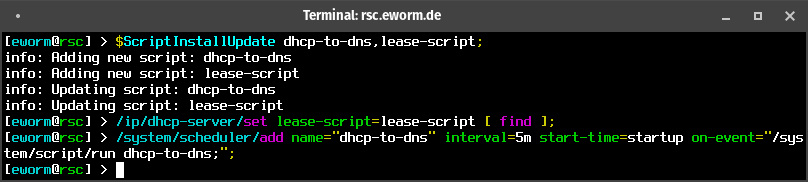
Some events can run a script. If you want your DHCP hostnames to be available
in DNS use dhcp-to-dns with the events from dhcp server. For a regular
cleanup add a scheduler entry.
$ScriptInstallUpdate dhcp-to-dns,lease-script;
/ip/dhcp-server/set lease-script=lease-script [ find ];
/system/scheduler/add name="dhcp-to-dns" interval=5m start-time=startup on-event="/system/script/run dhcp-to-dns;";
There's much more to explore... Have fun!
Available scripts
- Find and remove access list duplicates (
accesslist-duplicates) - Upload backup to Mikrotik cloud (
backup-cloud) - Send backup via e-mail (
backup-email) - Save configuration to fallback partition (
backup-partition) - Upload backup to server (
backup-upload) - Download packages for CAP upgrade from CAPsMAN (
capsman-download-packages) - Run rolling CAP upgrades from CAPsMAN (
capsman-rolling-upgrade) - Renew locally issued certificates (
certificate-renew-issued) - Renew certificates and notify on expiration (
check-certificates) - Notify about health state (
check-health) - Notify on LTE firmware upgrade (
check-lte-firmware-upgrade) - Check perpetual license on CHR (
check-perpetual-license) - Notify on RouterOS update (
check-routeros-update) - Collect MAC addresses in wireless access list (
collect-wireless-mac) - Use wireless network with daily psk (
daily-psk) - Comment DHCP leases with info from access list (
dhcp-lease-comment) - Create DNS records for DHCP leases (
dhcp-to-dns) - Automatically upgrade firmware and reboot (
firmware-upgrade-reboot) - Download, import and update firewall address-lists (
fw-addr-lists) - Wait for global functions und modules (
global-wait) - Send GPS position to server (
gps-track) - Use WPA network with hotspot credentials (
hotspot-to-wpa&hotspot-to-wpa-cleanup) - Create DNS records for IPSec peers (
ipsec-to-dns) - Update configuration on IPv6 prefix change (
ipv6-update) - Manage IP addresses with bridge status (
ip-addr-bridge) - Run other scripts on DHCP lease (
lease-script) - Manage LEDs dark mode (
leds-day-mode,leds-night-mode&leds-toggle-mode) - Forward log messages via notification (
log-forward) - Mode button with multiple presses (
mode-button) - Manage DNS and DoH servers from netwatch (
netwatch-dns) - Notify on host up and down (
netwatch-notify) - Visualize OSPF state via LEDs (
ospf-to-leds) - Manage system update (
packages-update) - Run scripts on ppp connection (
ppp-on-up) - Act on received SMS (
sms-action) - Forward received SMS (
sms-forward) - Play Super Mario theme (
super-mario-theme) - Chat with your router and send commands via Telegram bot (
telegram-chat) - Install LTE firmware upgrade (
unattended-lte-firmware-upgrade) - Update GRE configuration with dynamic addresses (
update-gre-address) - Update tunnelbroker configuration (
update-tunnelbroker)
Available modules
- Manage ports in bridge (
mod/bridge-port-to) - Manage VLANs on bridge ports (
mod/bridge-port-vlan) - Inspect variables (
mod/inspectvar) - IP address calculation (
mod/ipcalc) - Send notifications via e-mail (
mod/notification-email) - Send notifications via Gotify (
mod/notification-gotify) - Send notifications via Matrix (
mod/notification-matrix) - Send notifications via Ntfy (
mod/notification-ntfy) - Send notifications via Telegram (
mod/notification-telegram) - Download script and run it once (
mod/scriptrunonce) - Import ssh keys for public key authentication (
mod/ssh-keys-import)
Installing custom scripts & modules
My scripts cover a lot of use cases, but you may have your own ones. You can
still use my scripts to manage and deploy yours, by specifying base-url
(and url-suffix) for each script.
This will fetch and install a script hello-world.rsc from the given url:
$ScriptInstallUpdate hello-world "base-url=https://git.eworm.de/cgit/routeros-scripts-custom/plain/";

For a script to be considered valid it has to begin with a magic token. Have a look at any script and copy the first line without modification.
Starting a script's name with mod/ makes it a module and it is run
automatically by global-functions.
Removing a script
There is no specific function for script removal. Just remove it from configuration...
/system/script/remove to-be-removed;

Possibly a scheduler and other configuration has to be removed as well.
License
This program is free software: you can redistribute it and/or modify it under the terms of the GNU General Public License as published by the Free Software Foundation, either version 3 of the License, or (at your option) any later version.
This program is distributed in the hope that it will be useful, but WITHOUT ANY WARRANTY; without even the implied warranty of MERCHANTABILITY or FITNESS FOR A PARTICULAR PURPOSE. See the GNU General Public License for more details.